Exploring Smarter Medical Data Annotation With TensorAct

According to a 2026 survey of healthcare leaders, 63% of organizations now run AI in at least one live workflow. Yet 62% say fragmented data systems are still their biggest barrier to scaling it further.

A large part of that fragmentation starts with medical data annotation. Medical images, clinical records, videos, and audio files all need to go through structured annotation and review workflows before they can be used as healthcare AI training data. 

As projects scale, that process grows more complex. Data moves between annotators, reviewers, and supervisors across multiple stages, and teams often end up juggling disconnected tools just to keep things moving.

Quality data annotation drives reliable healthcare AI. (Source: Pexels)

TensorAct was built specifically for this challenge. As a cutting-edge data annotation platform, TensorAct brings dataset organization, flexible review workflows, and custom annotation interfaces or templates into a single environment, so teams spend less time managing tools and more time building better data.

Let’s break down why medical data annotation is uniquely complex, and how TensorAct helps teams manage it more efficiently at scale.

What Makes Medical Data Annotation So Complex?

At first glance, medical data annotation may look like any other labeling project. Data comes in, annotators review it, labels are added, and the dataset moves into model training. In reality, the workflow is far more layered than that.

Healthcare AI training data is often multimodal, meaning teams work with several types of medical data within the same pipeline. This can include medical images, DICOM (Digital Imaging and Communications in Medicine) scans, clinical records, PDFs, audio files, and surgical videos, all handled within a single project.

Each data type comes with its own review process, tooling requirements, and level of specialist involvement, making healthcare annotation workflows far more complex than standard data labeling pipelines.

How Medical Data Annotation Review Requirements Vary

The review process for medical data labeling is unique to each task. Some annotations only need a quick check before moving ahead. Others may need several specialists to review the same piece of data to make sure everything is accurate for AI training.

That is why human-in-the-loop workflows are so important for AI in healthcare. Medical experts stay involved throughout the review process, helping verify annotations instead of leaving everything to automation.

That attention to detail and maintaining review quality can have a major impact on model performance later on. For example, in a study on osteosarcoma (bone cancer) detection, researchers found that AI models trained on lower-quality annotations achieved only 60–70% sensitivity. After retraining the same model using expert-annotated data, sensitivity increased to 95.52% and specificity reached 96.21%.
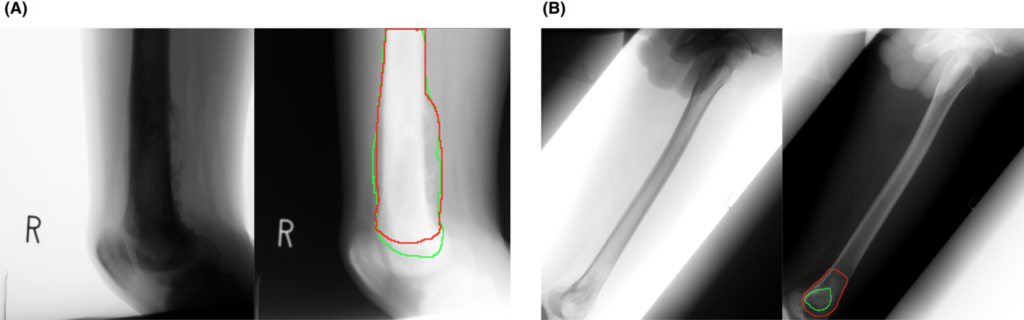
Lesion Detection: Expert-Annotated Boundaries (Red) vs. AI Segmentation (Green) (Source)

These results show how much review quality matters in healthcare annotation. But maintaining that standard becomes harder as projects grow. Teams often end up relying on spreadsheets, manual follow-ups, and disconnected tools just to keep datasets, reviews, and approvals moving between stages.

Medical Data Annotation Across Healthcare Domains 

A key reason healthcare annotation workflows are tricky to manage is that every project operates differently. The data, the review process, and the level of specialist involvement change depending on what the AI system is being trained to do.

Here are some common healthcare AI training data workflows teams work with today:

  • Radiology Annotation Workflows: Radiology projects involve labeling medical imaging annotation datasets, including DICOM files. DICOM annotation requires interfaces built to handle multi-frame imaging data and embedded metadata alongside the scan itself. Structures, boundaries, abnormalities, and regions of interest have to be annotated consistently across large volumes of scans.
  • Pathology Annotation Workflows: These workflows focus on high-resolution tissue samples. Small differences in cell structures and classifications have to be labeled with very high precision. 
  • Clinical Data Annotation: Clinical data projects involve patient records, discharge summaries, and healthcare documentation. Both structured and unstructured text need to follow clearly defined labeling standards. 
  • Medical Speech Annotation: Speech annotation workflows involve clinical conversations, physician dictations, and diagnostic recordings. Transcription accuracy, speaker separation, and timing all play an important role. 
  • Surgical Video Annotation: Surgical video projects often require teams to label long procedural recordings frame by frame. This can include surgical stages, instrument interactions, and actions taking place throughout the procedure. 

Each of these workflows runs differently. Some projects may require multiple rounds of data-annotation specialist review before annotations are approved, while others rely on entirely different annotation interfaces or validation steps. These variations make medical data annotation workflows harder to standardize across projects. 

Managing Healthcare AI Training Data Across Multiple Data Types 

Before healthcare teams can annotate anything, they have to bring the data together first. That sounds straightforward until files start coming in from different hospital systems, storage platforms, and departments at the same time.

A single medical AI system can involve radiology scans, clinical PDFs, patient records, medical images, audio files, and procedural videos, all moving through the same pipeline. Some datasets may already exist in cloud storage, while others are uploaded manually from internal systems. Instead of working with a single, clean data source, teams often pull information from multiple environments at once.

In addition to this, the scale of healthcare data makes it even harder to manage. One report estimated that the healthcare industry generates nearly 30% of the world’s total data volume, largely driven by medical imaging, electronic health records, and connected health devices. 

TensorAct Keeps Healthcare AI Training Data Organized at Scale

TensorAct helps healthcare teams manage this complexity by bringing dataset management and annotation workflows into a single platform. Instead of juggling multiple storage systems and tools, teams can organize, manage, and prepare healthcare AI training data within a centralized environment.

Files can be uploaded directly or imported from AWS S3, making it easier to bring together medical images, clinical documents, patient records, audio recordings, and videos from different sources. For larger projects, entire folders can be imported from connected S3 buckets, streamlining the onboarding of large datasets.

By keeping dataset organization, storage integrations, and annotation workflows connected, TensorAct enables healthcare teams to spend less time managing data and more time producing high-quality training data for medical data annotation projects.

Building Smarter Medical Data Annotation Workflows

As we’ve seen earlier, reviews play a much larger role in healthcare annotation than in many standard labeling projects. 

For example, brain tumor segmentation involves outlining tumor boundaries within MRI scans, so AI models can learn to distinguish cancerous tissue from healthy tissue. But getting those boundaries right usually requires several review stages, not just a single validation pass. 

In a recent study on brain tumor segmentation, initial segmentations were first generated automatically, then refined by expert radiologists, and finally reviewed by senior neuroradiologists before the labels were approved. This level of review is important because annotation mistakes in healthcare can directly affect diagnostic outcomes, not just dataset quality.
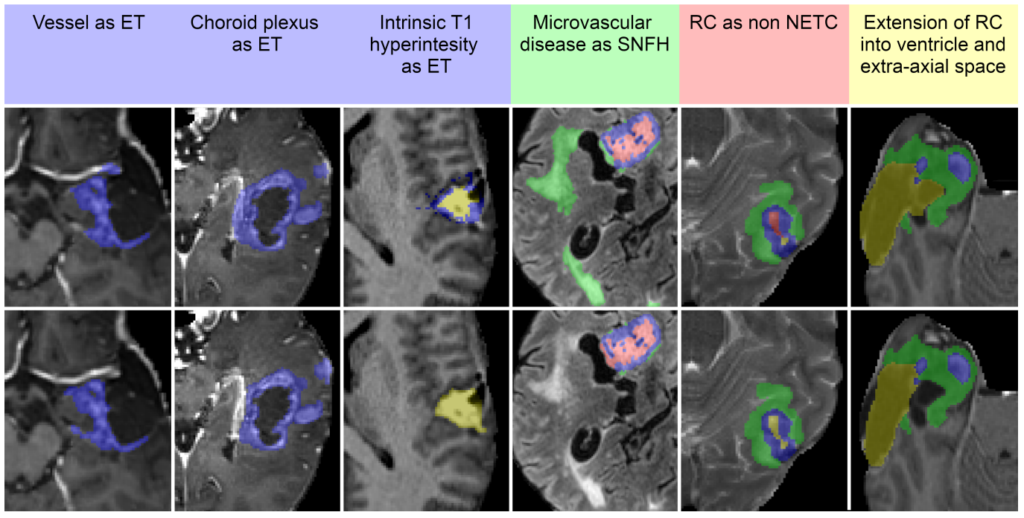
Automated vs. Expert-Corrected Brain Tumor Segmentation (Source)

That’s where rigid annotation systems often start creating problems. Healthcare projects rarely follow a single fixed review process, and workflows become difficult to manage when multiple specialists and approval stages are involved.

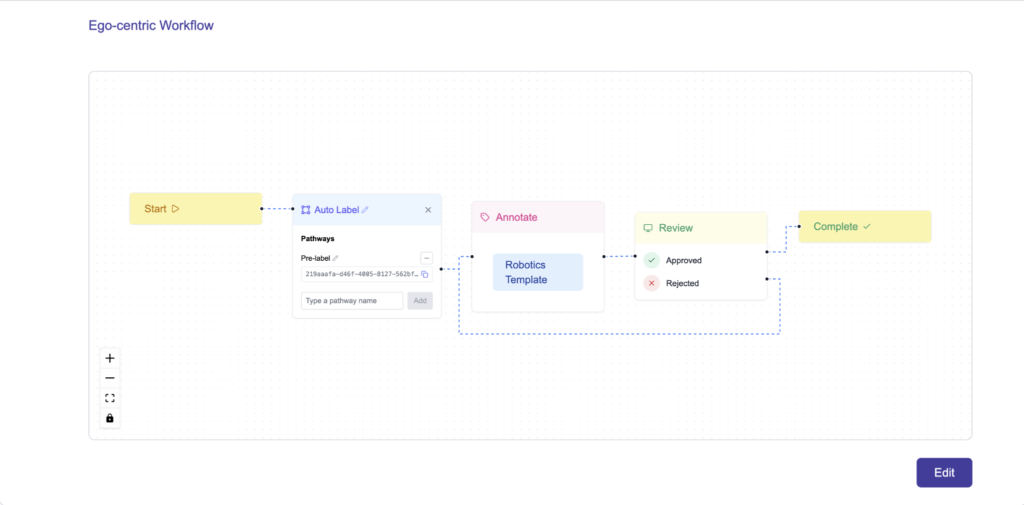
TensorAct takes a more flexible approach to workflow management. One of its core features is a visual drag-and-drop workflow builder that lets teams create review pipelines based on the way their projects already operate. As review stages or validation requirements change, workflows can be updated without rebuilding the entire process. 

Core TensorAct Workflow Nodes Used in Healthcare Projects

Here are the key nodes used to build healthcare annotation workflows in TensorAct: 

  • Start node: Every task enters the workflow here before moving into the stages configured by the team. It acts as the fixed starting point of the pipeline.
  • Annotate node: This node provides an annotation interface tailored to the data type, whether medical imaging annotation, clinical text, or video. Multiple Annotate nodes can be added to support different labeling rounds. 
  • Review node: After annotation, tasks move into review, where specialists validate the work. Reviewers can approve a task, move it forward, or reject it for correction. Multiple Review nodes can also be stacked together for layered validation workflows.
  • Output node: Once a task has cleared all annotation and review stages, the Output node prepares the completed labels for export to downstream systems or AI training pipelines.
  • Plugin node: This node allows external systems and AI agents to connect directly into the workflow. Teams can use it for tasks like AI-assisted pre-labeling or external task processing before the workflow continues.
  • Complete node: The final stage of the pipeline. Once a task reaches this node, the medical data annotation workflow is officially finished.

Custom Templates for Medical Image Annotation Tasks in TensorAct

Medical data annotation projects don’t always fit neatly into standard annotation interfaces. Different types of medical data often need different layouts, labeling tools, and review setups depending on the workflow. 

That is where TensorAct’s custom template feature becomes useful. Instead of forcing teams into a fixed annotation interface, TensorAct allows users to upload and use custom annotation templates that match their existing workflows and data requirements.

This is especially vital for DICOM annotation and other specialized medical imaging workflows, where standard annotation interfaces may not support the file structures, imaging views, metadata, or review requirements teams need. Rather than adapting workflows to a rigid interface, teams can deploy custom templates tailored to their annotation process and connect them directly to TensorAct workflows.

Existing custom templates from Amazon SageMaker Ground Truth, AWS’s managed data labeling service, can also be imported directly into TensorAct instead of being rebuilt from scratch. 

Connecting External Systems Through Plugin Nodes within TensorAct 

As healthcare AI projects scale, not every annotation task requires the same level of human involvement. Some cases may need detailed review from specialists, while others can be partially automated before reaching a reviewer.

For example, a dental AI model trained to identify implants, crowns, root canals, and fillings could be connected to TensorAct through a Plugin Node. Instead of starting with a blank X-ray, incoming images could first be analyzed by the model, which generates preliminary annotations for the dental structures it detects.

Dental specialists would then review those predictions, correct any inaccuracies, and validate more complex cases. This allows experts to focus their time on quality control and difficult edge cases rather than manually labeling every image from scratch.
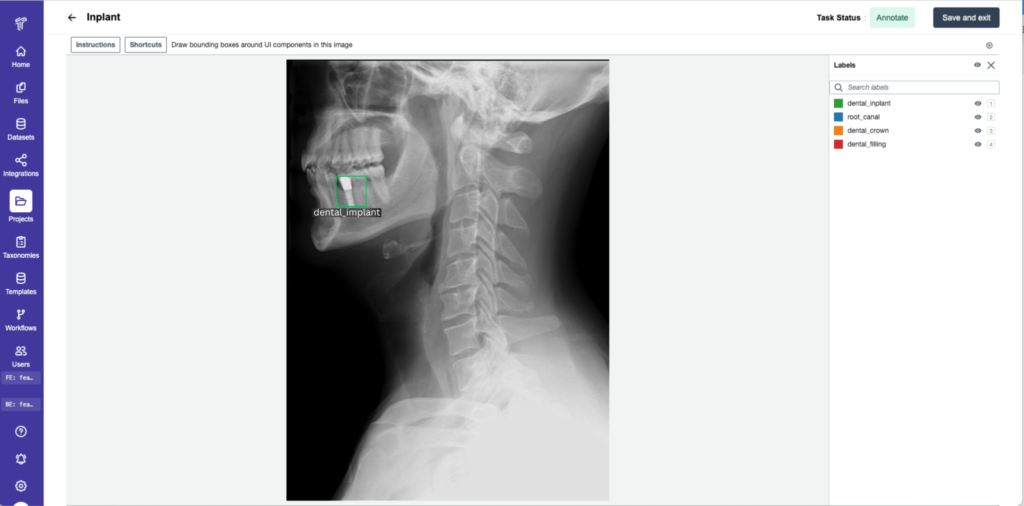
An Example of Annotating Dental Structures on an X-Ray Using TensorAct

TensorAct supports these AI-assisted workflows through its Plugin Node feature. When a task reaches a Plugin Node, it can be sent to an external AI model or agent for processing before returning to the workflow. The platform then routes the task based on the result. High-confidence predictions can move directly to the next stage, while uncertain or complex cases can be sent to specialist reviewers for validation.

Each Plugin Node supports up to five configurable pathways, giving teams precise control over how tasks move through annotation, review, and approval stages. This allows organizations to combine automation and human expertise within a single medical data annotation workflow.

Managing Healthcare Annotation Teams at Scale

Features like customizable workflows, custom annotation templates, and Plugin Nodes help healthcare teams build annotation processes around their specific requirements. As projects grow, however, effective team management becomes just as important as workflow design.

TensorAct includes a dedicated Teams tab within each project, letting organizations assign roles such as annotator, reviewer, project supervisor, and project viewer. Access is managed at the project level, ensuring team members only see the tasks and workflow stages relevant to their responsibilities.

By combining role-based access with flexible workflows, TensorAct helps healthcare teams keep annotation, review, and approval processes organized as medical data annotation projects scale.

Rigid Medical Imaging Annotation Tools Slow Teams Down

As we’ve seen throughout this article, healthcare annotation workflows rarely follow a single process. Different projects require different datasets, review stages, annotation interfaces, external AI systems, and team structures.

Managing that complexity becomes difficult inside rigid annotation tools. Teams often end up creating workarounds just to keep workflows moving when annotation interfaces, review pipelines, and external systems need to operate together.

The impact of annotation quality is already evident in clinical AI. For instance, in a large-scale mammography screening study, AI models trained on high-quality annotated imaging data reduced false positives from 2.39% to 1.63% and lowered unnecessary patient recalls by 20.5%, improving detection accuracy while reducing avoidable follow-up procedures.
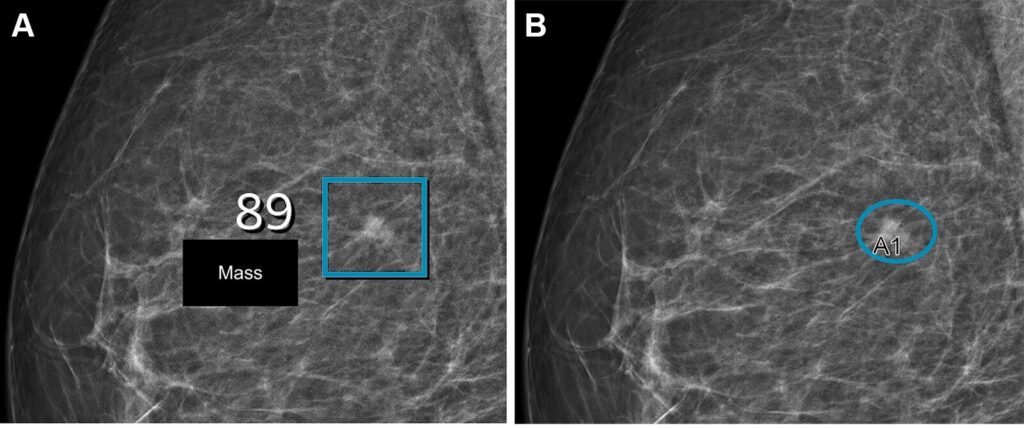
AI-Assisted Breast Cancer Detection in Mammography Scans (Source)

This is exactly why workflow flexibility matters in healthcare AI. TensorAct makes it easier for teams to adjust review stages, use custom medical image annotation interfaces, connect external AI systems, and manage workflows around how their projects actually operate instead of adapting projects around rigid tooling.

Stop Working Around Your Annotation Tool. Try TensorAct.

Healthcare AI systems depend on training data that is accurate, consistent, and reviewed throughout the annotation process. Building and maintaining that data requires more than basic labeling tools.

As we’ve seen, healthcare teams often need to manage multiple data types, complex review workflows, custom annotation interfaces, external AI systems, and large annotation teams within the same project. Platforms built around rigid workflows can make that complexity harder to manage as projects scale.

TensorAct brings these capabilities together in a single healthcare data annotation platform. From dataset management and customizable workflows to custom templates, Plugin nodes, and role-based team controls, the platform gives organizations the flexibility to build annotation processes around their operational needs while maintaining high-quality healthcare AI training data.

Want to see how TensorAct supports complex medical data annotation workflows? Book a demo to explore the platform and see how it fits into your AI pipeline.

Frequently Asked Questions

  • What is medical data annotation?
    • Medical data annotation is the process of labeling healthcare data like medical images, clinical records, and surgical videos so AI models can learn from it. The annotated data helps healthcare AI systems recognize patterns and improve accuracy.
  • What are medical imaging tools?
    • Medical imaging tools are technologies used to capture images of the body for diagnosis and treatment. Common examples include X-rays, CT scans, MRI, ultrasound, PET scans, and fluoroscopy.
  • What is a data annotation platform?
    • A data annotation platform is a tool used to label and organize data like images, text, audio, and video for AI training. It helps teams manage annotation workflows, reviews, and datasets more efficiently while preparing training data for machine learning models.
  • What does DICOM stand for?
    • DICOM stands for Digital Imaging and Communications in Medicine. It is the standard format used to store, share, and manage medical imaging data like X-rays, MRIs, CT scans, and ultrasounds across healthcare systems.
  • How is AI used in medical healthcare?
    • AI is used in healthcare to analyze medical data, support diagnosis, improve workflows, and assist with treatment planning. It can help detect diseases from medical images, process clinical records, automate repetitive tasks, and support faster decision-making for healthcare teams.
Simplify Your Data Annotation Workflows with TensorAct

Organizations lose at least $12.9 million every year to something entirely preventable: poor data quality. For companies building robotics and automation systems, that cost is directly tied to how well their systems are trained.

Most automated systems are trained on annotated data, meaning every label, marking, and classification in a training dataset directly shapes how a robot interprets objects, movements, and spatial changes in the real world. When that data is accurate and consistent, systems perform as expected. When it isn’t, even minor labeling errors lead to deployment failures, costly rework, and operational downtime.

This is a challenge that extends well beyond robotics. Across healthcare imaging, autonomous vehicles, and industrial automation, organizations managing large-scale data annotation pipelines face the same underlying problem.

Annotation tasks, review stages, approvals, custom interfaces, and external systems are often handled across multiple disconnected tools. When this happens, teams spend more time managing tools than managing quality, and as AI data annotation demands grow, that gap only widens.

TensorAct, our multimodal AI data annotation platform, was designed specifically to solve that problem. It brings dataset management, drag-and-drop workflows, custom annotation templates, and plugin-based AI agent integration into a single system, so annotation teams spend less time managing tools and more time building better data. 

Behind Every AI Innovation Is a Data Annotation Problem

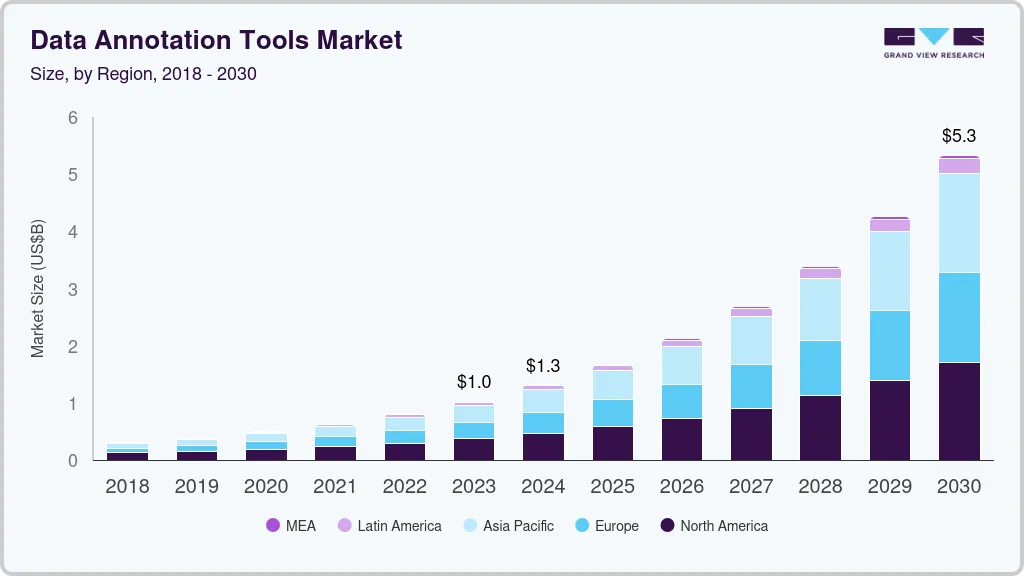
While there is plenty of buzz about new AI innovations, with new models and breakthroughs emerging almost every week, the silent foundation driving all of it is high-quality annotated data. In fact, the global data annotation tools market is projected to reach $5.3 billion by 2030. As that demand grows, so does the need for infrastructure that can support it.

The Global Data Annotation Tools Market (Source)

Our team has spent the past five years delivering AI projects across robotics, healthcare imaging, and industrial automation. Along the way, we’ve used every major data annotation platform available.

We found that most platforms were great at one part of the data annotation pipeline but required manual workarounds for the rest. They handle the labeling itself reasonably well, but everything around it, managing datasets, coordinating review stages, maintaining pipeline visibility, and building interfaces suited to the task, is either rigid, disconnected, or missing entirely.

Where Most Data Annotation Platforms Fall Short

Here are a few of the main issues we kept seeing with traditional data annotation tech:

  • Disconnected Tools and Limited Pipeline Visibility: Teams end up managing datasets in one place, tracking task progress in another, and coordinating review operations manually across tools that were never designed to work together. As projects grow, that fragmentation creates operational delays that are difficult to recover from. A team annotating LiDAR data for an autonomous vehicle project, for instance, shouldn’t need three separate platforms to manage files, track task status, and coordinate reviewer assignments.
  • Fixed Review Structures that Slow Down Quality Control: Annotation review isn’t one-size-fits-all. A healthcare team labeling medical imaging data may need three rounds of specialist review before a label is approved. A simpler classification project may need none at all. Rigid review workflows can’t accommodate that variation. When the platform can’t adapt, teams work around it manually, and quality control slows down as a result.
  • Generic Annotation Interfaces that Do Not Work for Specialized Projects: Predefined interfaces are built for general use cases. But robotics footage, medical imaging, 3D spatial data, and egocentric video each require annotation environments designed around the task itself. When annotators are working in an interface that wasn’t built for the data in front of them, annotation slows down, and consistency becomes harder to maintain.

That’s why we built TensorAct, a multimodal AI data annotation platform designed from the ground up to handle the full scope of annotation work within a single system. It is easy to use, cost-effective, and built to flexibly adapt to the needs of any annotation pipeline.

What Makes TensorAct Different From Other Data Annotation Tech

Most data annotation platforms are built around just data labeling. Everything else, workflow coordination, quality control, custom interfaces, and external integrations, is either an afterthought or left out entirely. As annotation pipelines grow in scale and complexity, those gaps create operational overhead that slows teams down and drives up the cost of maintaining data quality.

TensorAct was built around a different philosophy. Instead of solving one part of the pipeline well and leaving the rest to workarounds, TensorAct brings the following key capabilities together in a single system:

  • Dataset and File Management: Teams can upload, organize, and manage files and datasets directly within the platform, with native AWS S3 integration for large-scale cloud-based workflows.
  • Task Visibility and Pipeline Oversight: A dedicated Tasks view gives teams a clear picture of task status, assignments, review ownership, and progress across the entire pipeline in one place.
  • Configurable Drag-and-Drop Workflows: Workflows are built on a visual canvas, giving teams the flexibility to configure pipelines, review stages, and routing around the needs of the project rather than the constraints of the platform.
  • Custom Annotation Templates: Teams can upload custom annotation interfaces, giving annotators an environment designed specifically for the data type and task at hand.
  • Plugin-Based AI Agent Integration: External AI systems can connect to the pipeline natively through Plugin nodes, retrieving tasks, processing them externally, and returning them through defined pathways without disrupting the rest of the workflow.

Next, we’ll walk through how each of these capabilities works inside TensorAct and where they make the most impact.

Managing Files, Datasets, and Projects in TensorAct

Before any data annotation work can begin, data needs to be in the right place. TensorAct gives teams a structured way to bring files in, organize them into datasets, and connect everything into a single project, whether files are coming from a local machine or a cloud-based storage system.

Files can be uploaded directly from a local machine through the Files section, or imported from a connected AWS S3 bucket for teams working with large cloud-based datasets. Once uploaded, the platform stores a full copy and makes it immediately available for use. From there, files are organized into datasets, named collections grouped by data type, such as PDF or video, that can be reused across multiple projects as needed.

Projects bring all of these components together. Teams create projects directly within the platform by combining workflows, datasets, and users into a single operational setup. 

Once a project is active, the Tasks tab provides a real-time view of task status, assignments, review ownership, and the latest updates across the pipeline, giving teams the visibility they need to manage large annotation operations without losing track of progress.

TensorAct’s AWS S3 Integration for Scalable File Management

For teams managing large cloud-based datasets, manually moving files between storage systems is time-consuming and creates unnecessary operational overhead. TensorAct’s AWS S3 integration removes that step entirely. Once connected, teams can pull files directly from their S3 bucket into the platform without downloading or re-uploading anything.

Rather than making a copy of every file, TensorAct simply points to where the file already lives in S3. This keeps things clean and ensures the platform is always working with the right version of the data. Teams can also bring in entire folders at once by pasting an S3 folder path, making it quick and straightforward to import large batches of files at once.

Building Flexible AI Data Annotation Workflows in TensorAct 

Every data annotation project has its own rhythm. Some move through a single labeling stage and straight to output. Others require multiple rounds of annotation, specialist review, and structured approval before a task is considered complete. The pipeline that works for one project can be entirely wrong for another.

TensorAct is built around that reality. Data annotation workflows can be constructed on a visual drag-and-drop canvas, where teams connect nodes to define the exact path a task will take. Nothing is fixed in advance. Your data annotation pipeline is configured around the project, not the other way around.

TensorAct Lets You Build Customizable Workflows

Most data annotation tech locks teams into a fixed pipeline structure. When a project needs something different, teams work around it manually. TensorAct removes that constraint. Teams can build the data annotation pipeline their project actually needs, connect the right nodes in the right order, and adjust it as requirements change.

Core Workflow Nodes in TensorAct

Workflows in TensorAct can be built by combining five types of nodes. Here’s a quick look at what each one does:

  • Start Node: This is where every task enters the workflow. Think of it as the starting line; everything flows forward from here.
  • Annotate Node: This is where the actual annotation work happens. Each Annotate node is linked to a custom template that defines what annotators see when they open a task. Multiple Annotate nodes can be added to the same workflow for projects that require more than one round of labeling.
  • Review Node: Once a task is annotated, it moves to a reviewer who either approves or rejects it. Approved tasks move forward in the pipeline, while rejected tasks can be routed back for correction. Multiple Review nodes can be added for projects that require several rounds of quality control.
  • Output Node: This node handles how completed annotations are formatted and exported before they are sent to downstream systems or external workflows.
  • Plugin Node: When a task reaches this node, the workflow pauses and hands the task off to an external system or AI agent for processing. Once the external system is done, it returns the task through a defined pathway, and the workflow continues.
  • Complete Node: This is the finish line. Once a task reaches this node, the annotation process is done, and the task is marked as complete.

Configurable Review Paths within TensorAct

How a data annotation team handles reviews can make or break an annotation pipeline. TensorAct gives teams the flexibility to build a review process that actually fits the way they work.

Review nodes give teams control over how tasks move through the pipeline. Each node exposes two paths, one for ‘Approved Tasks’ and one for ‘Rejected Tasks’, and each path can connect to any subsequent node in the workflow. 

Consider a team annotating medical imaging data. A task that passes review moves forward to the Output node. A task that is rejected gets routed back to the annotator for corrections, then passes through a second specialist review before it can move forward again. That entire process is configured directly within the workflow, with no manual intervention or external coordination needed.

The same flexibility applies across any project type. A simpler classification project might route rejected tasks straight back to the annotator with no additional review stage. A more complex robotics dataset might require three rounds of validation before a label is approved. TensorAct accommodates both, without requiring any workarounds.

Using Custom Templates for Specialized Annotation Tasks

Not every annotation task can be handled with a generic interface. Some projects involve highly specialized data that requires an environment built around the task itself. Egocentric video annotation for robotics is a good example of this.

Egocentric video is footage captured from a person’s or a robot’s own point of view. When training a robot to perform tasks like folding a towel or picking up an object, that footage can span hundreds of frames, and each stage of the task needs its own annotations, frame ranges, and action labels. 

In a generic annotation interface, managing that level of detail is tricky. Annotation slows down, review becomes harder to coordinate, and maintaining consistency across the pipeline becomes more challenging.

TensorAct’s support for custom templates makes a huge difference here. Rather than asking annotators to work within a predefined environment that wasn’t designed for the data in front of them, teams can upload a template tailored to their exact workflow into TensorAct, giving them complete control over what annotators see and interact with during the labeling process.

An Example of Annotating Robotics Data Using a Custom Template inside TensorAct 

TensorAct accepts custom templates uploaded as .zip files through the Templates page. Supported file types include HTML, CSS, JavaScript, JSON, and Liquid, with at least one HTML file required. Once uploaded, a template can be connected directly to an Annotate node within a workflow, making it straightforward to use the right interface at the right stage of the pipeline.

This flexibility extends beyond robotics. Whether the project involves medical imaging, 3D spatial data, or audio-visual annotation, teams can upload an interface that matches the specific demands of the data type and task, rather than adapting their workflow to fit a generic environment.

Migrating Amazon SageMaker Ground Truth Templates into TensorAct

For teams already using custom templates within Amazon SageMaker Ground Truth, moving to TensorAct is straightforward. TensorAct supports the direct upload of existing SageMaker Ground Truth custom templates, so teams can keep using the annotation interfaces they already built without starting from scratch.

This means there is no disruption to existing workflows. Teams can upload their templates directly into TensorAct and pick up where they left off, without spending time rebuilding interfaces or reconfiguring annotation environments.

Extending TensorAct Workflows with Plugin Nodes

AI agents and systems are quickly becoming a core part of data annotation pipelines. Teams use them to pre-label data, flag low-confidence predictions for human review, and automate repetitive labeling tasks before annotators step in.

TensorAct is built to support that. Plugin nodes act as handoff points between TensorAct and external AI systems, making it possible for users to bring those systems directly into the annotation workflow without building custom integrations from scratch.

Here’s a closer look at how it works:

  • When a task reaches a Plugin node, the workflow pauses and waits for the external system to take over. 
  • The external system retrieves the task through TensorAct’s List Tasks API, processes or labels it externally, and pushes it back into the platform along with the processed data and a target pathway ID. 
  • TensorAct then matches the pathway ID, updates the task with any returned labels, and routes it to the next stage in the workflow.

TensorAct’s Plugin feature enables human annotators and external systems to work together within the same pipeline, with each handling the data annotation stages they are best suited for.

How Pathway-Based Routing Works

Let’s look at how pathway-based routing works and how it gives teams control over where tasks go next.

Each Plugin node can have up to five pathways configured inside it. Every pathway has a unique system-generated ID that is provided to the external system, and each pathway connects to a different node in the workflow.

Consider an AI agent pre-labeling a batch of robotics data annotation tasks. Some tasks are labeled with high confidence, while others carry more uncertainty. Pathway routing determines where each task moves next based on that outcome. 

For instance, a confident label may move directly to the Output node, and a lower-confidence prediction is routed to a human Review node instead. The decision is made by the external system at the time of submission, and the workflow adapts accordingly.

This means a single Plugin node can branch a workflow in multiple directions, all based on what the external system finds. Different outcomes lead to different paths, without any manual intervention needed to redirect tasks.

For this process to work correctly, the pathway ID used in the push API call has to exactly match the ID generated by the platform. TensorAct exposes each pathway ID directly within the Plugin node configuration and includes a copy option for quick access. This makes it easier for external systems to reference the correct route during submission. 

Where TensorAct’s Workflow Flexibility Matters Most

As you explore TensorAct’s key features, you might wonder how they translate to real annotation operations. Simply put, data annotation challenges look different across industries, but the problem is almost always the same. Teams end up building their workflows around the limitations of their tools, rather than the other way around.

For instance, for enterprise teams managing large annotation pipelines, scale exposes every weakness in a rigid system. As data volumes grow, the cost of managing datasets, tracking task progress, and coordinating file imports across disconnected tools adds up quickly. TensorAct gives these teams the operational foundation to grow without the overhead.

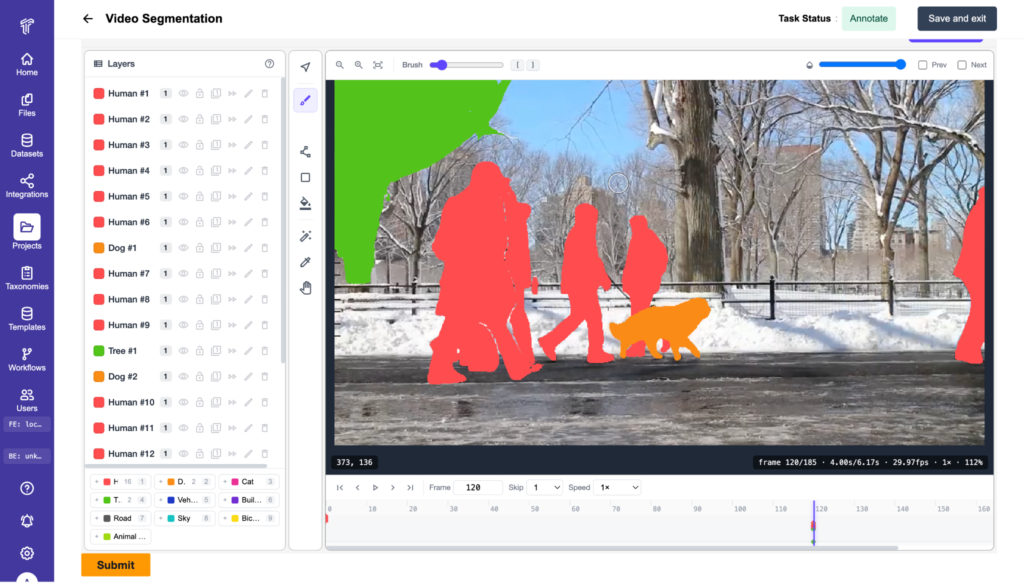
Similarly, for robotics teams, the annotation interface is crucial. A segmentation pipeline for a robot navigating a warehouse environment requires precise boundary annotations in every frame, and annotators need an environment designed around that task. Generic interfaces slow down work and introduce inconsistencies that are difficult to recover from. Custom templates in TensorAct put that control back in the team’s hands.

A Custom Template for Video Segmentation within TensorAct 

Meanwhile, healthcare teams know better than most that reviews aren’t a formality. Medical imaging annotation often requires multiple rounds of specialist validation, and a single linear review process rarely holds up under that pressure. TensorAct’s configurable review workflows give teams the structure to enforce the level of quality control the work demands.

Also, for teams bringing external AI systems into their pipelines, the coordination challenge is real. Human annotators and automated systems need to work in sequence without manual handoffs slowing everything down. TensorAct’s Plugin nodes make that seamless, routing tasks between systems automatically and keeping the pipeline moving.

Data Annotation Complexity is a Workflow Problem

Running a data annotation pipeline well is harder than it looks. Labeling is only one part of the process. Datasets, review stages, custom interfaces, and external integrations all need to work together, and when they don’t, data quality suffers.

As pipelines grow, that coordination challenge grows with them. When these pieces are spread across disconnected tools, operational overhead builds quickly, and the quality of training data begins to reflect it.

TensorAct is built to bring all of that together. Rather than managing each piece separately, annotation teams have everything they need in one place, from dataset management and configurable workflows to custom annotation templates and external integrations.

Ready to bring your annotation pipeline into one place? Get started with TensorAct today or schedule a demo to see it in action.

Frequently Asked Questions

  • What is data annotation?
    • Data annotation is the process of labeling raw data, such as text, images, audio, or video, to make it usable for AI and machine learning models. These labeled datasets give models the structured examples they need to learn from, recognize patterns, and make accurate predictions.
  • What are the 4 major benefits of data annotation?
    • Data annotation improves the quality of AI training data by giving models clear, structured examples to learn from. It helps models recognize patterns more accurately, reducing errors in real-world performance. It also makes it possible to train models across different data types, from images and video to audio and sensor data. And when annotation is done consistently and at scale, it directly improves the reliability of AI systems’ performance in production environments.
  • What is an example of data annotation?
    • For example, consider a robotics team training a robot to sort objects on a conveyor belt. Annotators label each video frame, marking the position, size, and type of every object the robot needs to identify. This labeled data is then used to train the robot to recognize and handle those objects accurately in a real warehouse environment.
  • What does an AI data annotator do?
    • An AI data annotator reviews and labels raw data to help AI models understand what they are looking at. Depending on the project, this could involve tagging objects in images, marking actions across video frames, transcribing audio, or flagging errors in model outputs. Their work sits at the foundation of every AI system, directly influencing how accurately a model performs once it is deployed.

Using TensorAct to Annotate Robot Data for Physical AI

The AI world is moving fast, and right now, all eyes are on robot data. Physical intelligence systems that use high-tech sensors to see the world around them and AI as a brain to make decisions are being built and deployed at a scale we have never seen before. However, for these robots to work reliably, they need massive amounts of high-quality robot data to learn from.

Major AI companies are stepping up to solve this data shortage. For instance, Google DeepMind, in collaboration with research labs across 21 institutions, recently released the Open X-Embodiment dataset, a robot data collection of over one million recordings from 22 different robot types, covering 527 skills and 160,000 different tasks. By making this data publicly available, they are giving the physical intelligence community the foundation it needs to train truly useful, general-purpose robots.

But what makes robot data so critical for training these systems? Unlike traditional AI models that process text or images, robots have to understand movement, spatial relationships, object interactions, and how actions occur over time. 

A robot dataset can’t just capture what is in a scene. It has to capture how everything in that scene changes, frame by frame. That is what makes robot data collection and robotics data annotation so important.

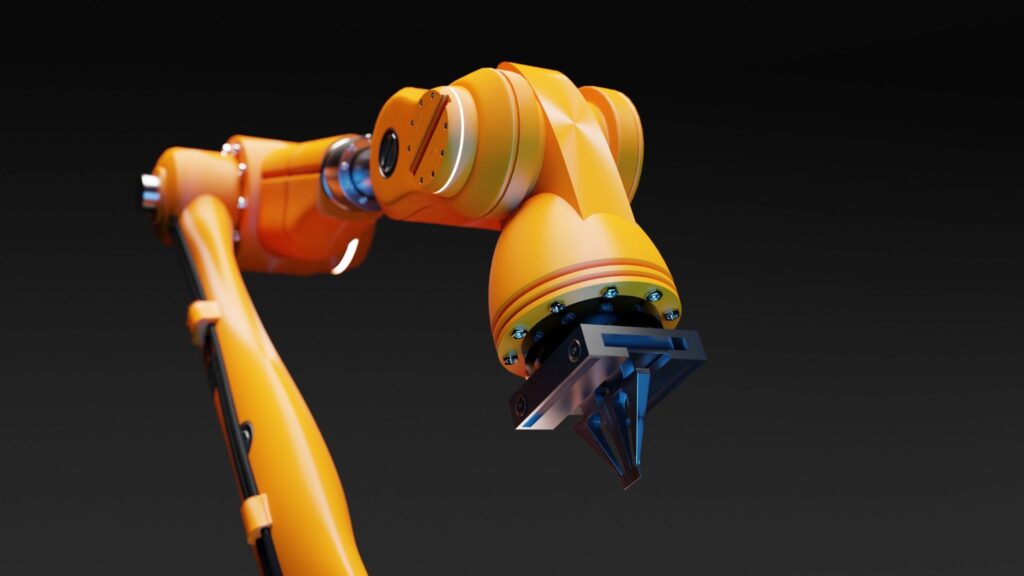
Accurate robot data annotation enables robotic arms to perform reliably. (Source: Pixabay)

The challenge is that annotating all of this robot data isn’t straightforward. Most traditional data annotation platforms were built for simpler computer vision tasks like image classification and object detection. They weren’t designed for the complexity of robotics workflows. Robotics teams need to annotate sequential actions, track changes in object states, and validate interactions across video frames and sensor data. 

These are challenges our team has run into firsthand, and they are exactly what pushed us to build something better. TensorAct is our answer to that problem. Our multimodal data annotation platform supports complex robotics workflows through custom annotation templates, drag-and-drop pipeline building, and plugin-based integrations for external AI systems. 

Let’s take a closer look at how TensorAct handles robot data annotation from the ground up.

Why Robotics Data Annotation Requires More Than Standard Tools

Before we dive into TensorAct, let’s understand why robotics annotation workflows are more complex than traditional labeling tasks. 

Instead of identifying static objects in a single image, robotics teams are training systems to take actions in a constantly changing world. That is a fundamentally different challenge, and it shows up most clearly when you look at how complex the data actually is.

Take self-driving vehicles as an example. A self-driving car is essentially a massive robot that needs to predict human behavior, track motion, and understand intent over time. Every movement, reaction, and environmental shift in its surroundings has to be considered.

Because of this, a human annotator can’t just label objects with classes like ‘pedestrian.’ They have to track the context of where that pedestrian is moving, how fast they are walking, and where they might step next. The industry has responded by building specialized datasets designed specifically for capturing these fluid interactions.

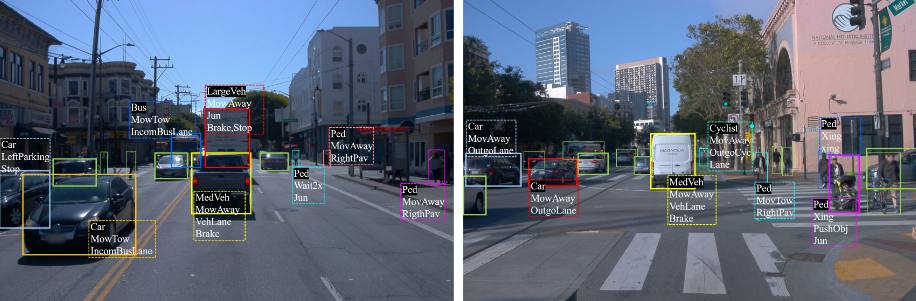
A great example of this in action is the ROAD-Waymo dataset. It features 198,000 carefully annotated video frames and 12.4 million individual labels. By mapping out exactly how events unfold second by second, datasets like this give autonomous systems the situational awareness they need to navigate unpredictable real-world environments safely.

ROAD-Waymo Annotations Capture Agent, Action, and Location Data (Source)

This level of robot data annotation goes far beyond simple bounding boxes or tags. Teams have to track object interactions, motion paths, and changing object states across frame sequences while maintaining consistency. Standard annotation tools weren’t built for that kind of complexity, which is exactly why TensorAct is essential for robotics data annotation workflows.

Meet TensorAct: Built for Robotics Data Annotation at Scale

TensorAct is a multimodal data annotation platform built to handle the complexity of robotics and physical intelligence workflows. Unlike most annotation tools that support a single data type, TensorAct supports images, video, audio, text, and PDF files, giving robotics teams one centralized environment to manage diverse datasets without jumping between tools.

What sets TensorAct apart is the level of configurability it brings to every part of the annotation process. Teams can build and upload custom templates or annotation interfaces designed specifically for their data type and workflow. 

Meanwhile, data annotation pipelines are constructed visually using a drag-and-drop workflow builder, where annotation stages, review layers, and approval routing can all be configured around the needs of the project. Also, support for multi-stage review workflows enables rigorous quality control.

On top of this, for robotics teams working with external AI systems, TensorAct’s plugin-based integrations make it possible for automation tools and machine learning pipelines to connect directly to annotation workflows through plugin nodes. This makes model-assisted labeling and API-based orchestration a natural part of the pipeline rather than a workaround.

In short, TensorAct bends to fit your robot data annotation needs, not the other way around. Next, let’s walk through how each of these capabilities works.

How TensorAct Custom Templates Support Robotics Data Annotation

TensorAct gives robotics teams the flexibility to upload custom templates for annotation, creating labeling environments designed specifically for their task, workflow, or data type. Complex robot data annotation needs purpose-built interfaces, not generic ones that teams have to work around.

Custom templates can be uploaded as ZIP packages containing HTML, CSS, JavaScript, JSON, and Liquid files. This gives teams full control over both the interface design and the underlying workflow logic. Once uploaded, templates connect directly to annotation stages within any workflow, making sure the right interface is always in front of the annotator at the right point in the pipeline.

For teams already using Amazon SageMaker Ground Truth, existing custom templates can be uploaded directly into TensorAct without rebuilding from scratch. 

Annotating Multiple Robotic Actions in a Single Interface

Custom templates are especially useful for robotics workflows that involve multiple actions happening in sequence. Rather than fragmenting the annotation process across different tools or stages, TensorAct’s custom interfaces let teams review and label multiple robotic actions within a single environment. 

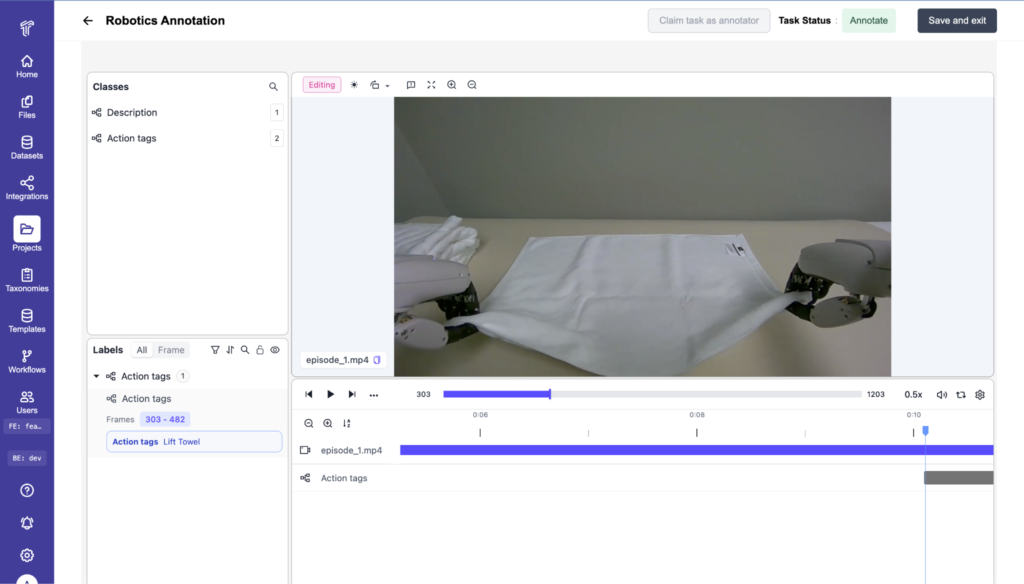
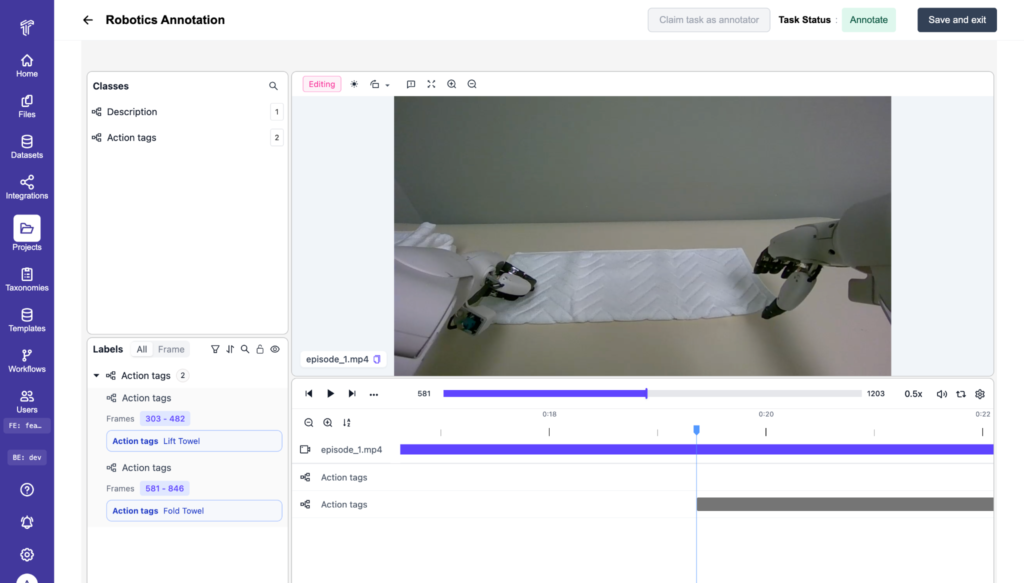
Take a robot learning to fold a towel as an example. A single annotation screen can be set up to capture every action involved in that task at once, from picking up the towel and aligning the edges to folding, smoothing, and placing it down. Instead of switching between tools or stages for each action, annotators can work through all five steps in one place, staying focused and maintaining a clear understanding of how each action connects to the next.

TensorAct Being Used to Label Robotic Actions from Video Data, like Folding Clothes 

The level of configurability enabled by TensorAct makes it much easier to handle complex robotics tasks like motion tracking, sequential action labeling, multi-object interactions, and sensor-based workflows. And that flexibility extends beyond templates into how annotation pipelines themselves are built.

Building Robotics Annotation Pipelines with TensorAct

Another key feature of TensorAct is its customizable workflow builder, which gives robotics teams the freedom to design annotation pipelines that match the specific needs of their datasets, rather than working around the constraints of a rigid system.

Using a simple drag-and-drop canvas, teams can map out exactly how tasks move through the annotation process, from initial labeling through to final approval.

The platform supports multiple annotation stages, making it straightforward to handle complex robotics tasks like robot action labeling, motion tracking, object interactions, and sequential behaviors. Teams can layer in multiple review stages as needed to verify annotations, maintain consistency, and keep quality high across large datasets.

Creating Flexible Annotation Pipelines in TensorAct

TensorAct also supports approval and rejection routing, so tasks can move fluidly between annotators, reviewers, and quality assurance teams without manual intervention. This keeps the validation process organized and reduces the bottlenecks that slow down production workflows.

For robotics datasets that require repeated reviews and ongoing refinement, that flexibility becomes crucial. As dataset requirements evolve, workflows can be adjusted on the fly, helping teams scale annotation operations for even the most complex robotics and physical intelligence projects without rebuilding their pipelines from scratch.

Inside TensorAct: Workflow Nodes That Power Robot Data Annotation

TensorAct’s customizable workflows are built by connecting a set of purpose-designed workflow nodes, each handling a specific stage of the annotation process. Here is what each node does:

  • Start Node: The Start node is the entry point of every workflow. Every task begins here before moving through the pipeline.
  • Annotate Node: The Annotate node is where the actual labeling happens. Each Annotate node is linked to a custom template that defines what annotators see when they open a task. For complex robotics workflows, multiple Annotate nodes can be added to the same pipeline, supporting more than one round of labeling.
  • Review Node: The Review node is where completed annotation tasks are sent for validation. It exposes two paths, one for approved tasks and one for rejected tasks, each of which can connect to any subsequent node in the workflow. Multiple Review nodes can be added for projects that require several rounds of quality control.
  • Output Node: The Output node handles how completed annotations are formatted and prepared for export to downstream systems or external workflows once a task clears review.
  • Plugin Node: The Plugin node is where the workflow hands tasks off to an external system or AI agent for processing. When a task reaches this node, the workflow pauses while the external system retrieves it, processes it, and returns it through a defined pathway ID. Each Plugin node supports up to five configurable pathways, giving teams flexible control over how tasks are routed after external processing.
  • Complete Node: The Complete node marks the final stage of the pipeline. Once a task reaches this node, the annotation process is finished, and the task is marked as complete. 

These nodes give robotics teams the building blocks to construct data annotation pipelines that reflect the real complexity of their robot data workflows.

Using Plugin Nodes to Automate Data Annotation for Robotics Workflows

So, how can a Plugin node make a real difference to your robotics data annotation workflow?

Consider a robotics team working through a large batch of video data. Rather than having human annotators label every frame from scratch, a Plugin node can hand tasks off to an AI pre-labeling system that automatically generates initial annotations. 

The pre-labeled tasks are then pushed back into the workflow, where human annotators review and refine them instead of starting from zero. This can significantly reduce the time and cost of annotating large robotics datasets.

The same approach works for confidence-based routing. When an external AI system processes a task, it can use pathway IDs to route high-confidence predictions directly to the Output node while flagging lower-confidence results for human review. Annotators can spend their time where it matters most, reviewing genuinely uncertain cases rather than working through data that has already been labeled accurately.

For robotics teams, that means less time spent on repetitive labeling and more time focused on the annotations that actually need a human eye. The speed of automated processing and the accuracy of human review work together in one pipeline rather than fighting against each other.

Managing Multimodal Robot Data Collection and Annotation at Scale

Next-generation robotics systems don’t rely on a single type of data. A robot navigating a warehouse environment might pull from video feeds, depth sensors, audio inputs, and text-based logs all at once. Likewise, a surgical robot might combine instrument video, motion data, and spoken instructions to understand what is happening in the operating room. 

This is what multimodal robot data looks like in action, and it is the norm rather than the exception for physical intelligence systems. The challenge for annotation teams is that managing all these data types across separate tools creates fragmentation that slows pipelines and introduces inconsistency in training data.

TensorAct supports video, images, audio, text, and PDF files within a single centralized platform, meaning robotics teams can manage different types of data in one place. No switching between tools for different data types, no reconciling annotations from separate systems, and no gaps in pipeline visibility. Everything lives in one environment, making it easier to maintain consistency and keep annotation operations running smoothly as datasets grow.

The Real Cost of Rigid Tools for Physical AI Data and Robotics Annotation

Building physical intelligence systems is not a one-and-done task. Unlike traditional AI systems that operate within relatively fixed parameters, robotics pipelines are constantly shifting as robots learn, encounter new environments, and take on more complex tasks.

Over time, teams need to fine-tune annotation rules, add review steps, update interfaces, or adapt to entirely new robot behaviors. With a rigid labeling system, even a small change can force you to tear down your entire workflow and rebuild it from scratch. That kind of disruption doesn’t just slow teams down. It kills momentum at exactly the moment when consistency matters most.

That is why flexibility is not a nice-to-have for robotics annotation teams. It is essential. TensorAct’s customizable templates and configurable workflows are built to grow alongside your robots, so teams can pivot and adapt without breaking what is already working.

When workflows are being disrupted by hardware updates, new training goals, or unexpected edge cases from real-world testing, you need infrastructure that can bend without breaking. TensorAct keeps your physical AI data consistent, your team focused, and your annotation pipeline moving forward, no matter how much your datasets grow or your requirements change.

Ready to build smarter, more adaptable physical intelligence systems? Book a demo today and see TensorAct in action.

Frequently Asked Questions

  • What is robot data?
    • In robotics, data includes information like sensor readings, video footage, and labeled actions that robots use to learn, adapt, and perform complex tasks.
  • What data do robots use?
    • Sensors like cameras, LiDAR, and accelerometers collect raw information about the robot’s surroundings. This data is then processed into a structured format using methods like analog-to-digital conversion, noise filtering, and coordinate transformations.
  • What is robotics annotation?
    • Robotics data annotation is the process of labeling multi-modal sensor data to train embodied AI systems, or machines that physically interact with their environment. Unlike traditional computer vision tasks, robotics annotation involves understanding actions, movement, spatial relationships, and real-world interactions.
  • What are the 5 types of robots?
    • The five main types of robots are pre-programmed robots, humanoid robots, autonomous robots, teleoperated robots, and augmenting robots. Each type serves a different purpose, from performing repetitive industrial tasks to assisting humans in dangerous or physically demanding environments.